0€

MiniPC.de – Small, flexible, powerful

«   Change to: CarTFT.com: Professional CarPCs and Displays

Sprache ändern:

Deutsch

Shop for small form factor systems

RSS Feed

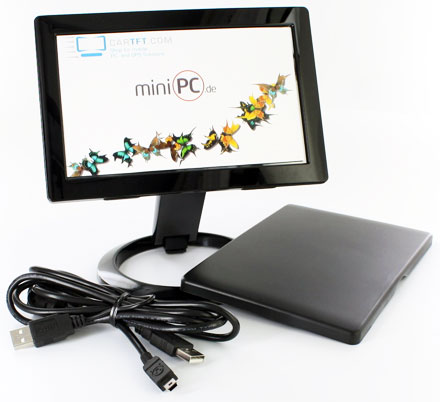
Nanovision UM-720S V2 (7" USB Touchscreen Display)

Nanovision UM-720S V2 (7" USB Touchscreen Display)
3D 360° View
  • Displaylink !
  • 800x480 !
  • Touchscreen !

This TFT monitor is connected to a Windows PC USB connector. The display is working as an additional display which can be added to the main display area on the left, right, upper or lower. Alternatively it can mirror the primary screen. The display can be swiveled in steps of 90°.

In addition, the UM-720S model comes with touchscreen.

The UM-720S comes with integrated mounting and protection ! Simply turn over the rear side of the display to get a stand.

Specifications :

System requirements:
- CPU : 1.2Ghz+
- RAM : 512MB RAM+
- USB : min. 1x USB 2.0
- HDD : 30MB
- OS : Windows 2000 SP4
[more]
Share

169.95 EUR
incl. 19% VAT, plus shipping
Available in 1-3 days

4 von 5 Sternen
34 ratings

Add to cart

This TFT monitor is connected to a Windows PC USB connector. The display is working as an additional display which can be added to the main display area on the left, right, upper or lower. Alternatively it can mirror the primary screen. The display can be swiveled in steps of 90°.

In addition, the UM-720S model comes with touchscreen.

The UM-720S comes with integrated mounting and protection ! Simply turn over the rear side of the display to get a stand.

Specifications :

System requirements:
- CPU : 1.2Ghz+
- RAM : 512MB RAM+
- USB : min. 1x USB 2.0
- HDD : 30MB
- OS : Windows 2000 SP4, Windows XP SP2 (32bit), Windows Vista & 7 & 8 (32bit/64bit)
Notes :
- 3D applicationes (eg. 3D games) can not be displayed.

- How many displays can be connected to a PC at the same time ?
1-2 displays : 1.2Ghz CPU, 512MB RAM
3-5 displays : 1.8Ghz CPU, 1GB RAM
6++ displays : 1.6Ghz Dual-Core CPU, 1GB RAM

- MAC OS Support ?
Display, webcam, etc. : Yes
Touchscreen (MAC OS) : Right now only available with non-free 3-rd party driver.

Touchscreen-Driver for Windows is free and included with the shipment !

Model UM-720S V2 (7")
LCD Panel Size 17.78 cm
Display Size 153mm (H) x 93mm (V)
Pixel Pitch 0.1905mm (H) x 0.1905mm (V)
Number of Colors 16.7M
Contrast 400:1
Brightness 350 cd/m²
Input Power USB (DC 5V)
Screen resolution WVGA (800x480)
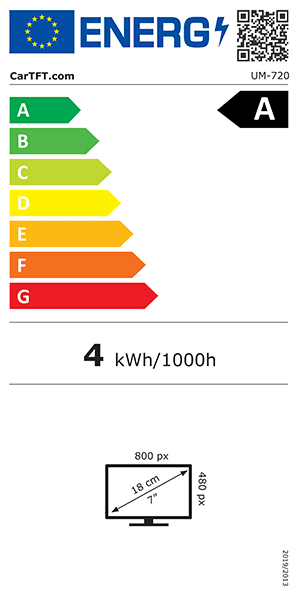
Power consumption 2W~4.5W
Dimensions 119mm (H) x 180mm (L) x 22mm (W)
Weight ~0,6 kg
Data sheet Download (PDF)
Data sheet [Energy efficiency class] Download (PDF)
Data sheet Print view
Driver (Windows) Download
Please login for creating product ratings.
Your rating:

Please tell us your opinion. Rate the product on a scale from 1 to 5. A value of 5 means the best possible rating. If you want you also can leave a comment.

Your ratings are honored on many ways. Your report will help other customers to better judge about the products. And you can benefit from reports other customers are giving.

In addition we credit 0.50 EUR for each given rating with comment and 1.00 EUR for each given rating with comment (more than 150 characters) on your account. The credit will be substracted automatically on your next order !

We reserve us the right to delete given comments (for example on attempts to give comments with senseless content, copying of other comments, inserting of foreign content, abusing the system for financing orders). "Fair-use-policy" does apply (as of rule of thumb you should give comments for products which you have purchased already. And your credit account only in rare cases will have 2 or even 3 digits). The credit can only be withdrawn by placing an order. It is not possible to get the credit cash or transferred in an other way.

Customer ratings: 4 von 5 Sternen
Average rating, based on 34 ratings
3 von 5 Sternen from stripslashes am 28.05.2010 |

Bildqualität und Verarbeitung ist super. Die Treiber auf der CD haben unter Windows XP nicht funktioniert, mit den Treibern von http://www.mimomonitors.com/pages/customer-support hat er aber einwandfrei funktioniert. Nach zwei Wochen ist er leider gestorben - wohl durch eine Überspannung in einem USB-Hub. Ob es am Bildschirm lag kann ich nicht genau sagen. Werde einen zweiten bestellen.

5 von 5 Sternen from mfnieuwhoff am 03.05.2010 |


with a lot of problems I managed to install the program. Microsoft gave me some negative advice NOT to install, but in the end I succeeded, ignoring the warning.
But the monitor remained totally blanc. Only once I saw the "on and off"indicator turn blue and that was it.
My computer became so slow, that I had to call someone else to help me out.

Eventually he succeded to uninstall mycomputer.
That was. unfortunately, my experience with your product/

4 von 5 Sternen from veiztex am 03.05.2010 | See all my comments
3 von 5 Sternen from emente am 29.04.2010 |

Total gutes Produkt, total beschissene Treiber.

Die Displaylink-Treiber sind relativ zicking, ich bekomme unter XP das Display nur dann eingeschaltet wenn ich es erst deaktiviere und dann wieder auf Spiegeln oder Erweitern schalte. Das Nvidia-controlpanel stürzt ab wenn ich die Auflösung des display manuell zufüge, wenn ich das nicht tue läuft Spielen in 800x600 statt in 800x480. Die Touchscreen-treiber sind ein totaler Witz. Wenn ich (im Mehr-Monitor-Betrieb) ein desktop auswähle für den der Touchscreen zuständig sein soll beschränkt sich jede touch-aktion auf einen 10-pixel bereich auf dem primären Monitor. Händisch pixelabstände eintragen hilft auch nicht.

5 von 5 Sternen from mkrebs am 15.04.2010 |

Klasse Gerät, ich bin echt begeistert.
Unter Windows musste ich mir nur neuere Touchscreen-Treiber besorgen, da sonst die Kalibrierung nicht richtig funktioniert hat. Die Einstellungen des Treibers sind teils nur dürftig erklärt und schlecht lokalisiert.
Der Monitor läuft auch problemlos unter Linux (Ubuntu 9.10) auf meinem Netbook (obwohl Linux nicht offiziell unterstützt wird). Wer eine Anleitung zur Installation des Monitors sucht, sollte sich http://mulchman.org/blog/?tag=displaylink oder http://blogg.noonday.se/2010/01/28/linux-usb-video-adapter/ anschauen. Die Touchscreen-Funktionalität bekommt ihr mit http://www.pur3.co.uk/view.php?DisplayLink zum Laufen.

BACK 1 2 3 4 5 6 7 8 Forward
  • Description
  • Specifications
  • Data sheets and downloads
  • Customer ratings
  • Related products